 nox.cool
Agents in colour, and Nox in your meeting's chat
nox.cool's agents now each wear their own colour, in the light theme and the dark one, and show a small moving picture of what they're doing as they work. Nox can also take part in a video meeting's chat, and nothing it writes there goes out without you.

Key points
- Every agent is painted in its own colour, chosen from eight, and looks the same in the light theme and the dark one.
- While an agent works, a small moving picture beside its face shows what it's doing: searching, reading, writing, clicking, sending, and 11 more.
- In a video meeting, Nox says who it is in the meeting's chat when it's let in.
- A question someone writes to Nox in the meeting's chat comes to you as a card with a suggested answer. Nothing is posted until you press Post.
- After the meeting, Nox saves the notes, prepares a follow-up email for you to send, and points out anything that shouldn't go to people outside.
- Four new ready-made agents: Rival Insider, Field News Desk, Daily Product Walk and Event Page Maker.
nox.cool's agents now each wear their own colour and show what they're doing while they work. Nox can also take part in a video meeting's chat as your note-taker, and nothing it writes there goes out without your OK. Four new ready-made agents are in the marketplace too.
How do I tell my agents apart?
Each agent is now painted in its own colour: yellow, pink, blue, violet, orange, green, cyan or red. The colour is the same in the light theme and the dark one, so a face reads the same against a white page or a black one. Nox, the main agent, is yellow.
To change one:
- Open New agent, or an agent's own settings.
- On the Face tab, pick a face, then a colour from the row under it.
- The preview changes as you pick. Press Create agent or Save.
How do I see what an agent is doing?
While an agent works, a small moving picture sits beside its face, in the sidebar, in the task and on the home screen. There are 16 of them, one for each kind of step: a magnifier going round while it searches, lines filling in while it reads, a pencil while it writes, a pointer pressing while it clicks, a paper plane while it sends, a shield around money, a question mark when it's waiting for you, and Zs while it waits its turn.
How does Nox take part in a meeting?
Ask Nox to join a Google Meet, Zoom, Microsoft Teams, Webex, Jitsi or Whereby call by its link, or let it join from your calendar. Once someone lets it in:
- It writes one line in the meeting's chat saying it's an AI agent taking notes for you, and how to ask it something.
- When someone writes a message that starts with its name, you get a card with their question and a suggested answer, taken only from what was said in that meeting. Change it if you like, then press Post in the meeting, or Skip.
- You can write into the meeting's chat yourself from the meeting card in nox.cool.
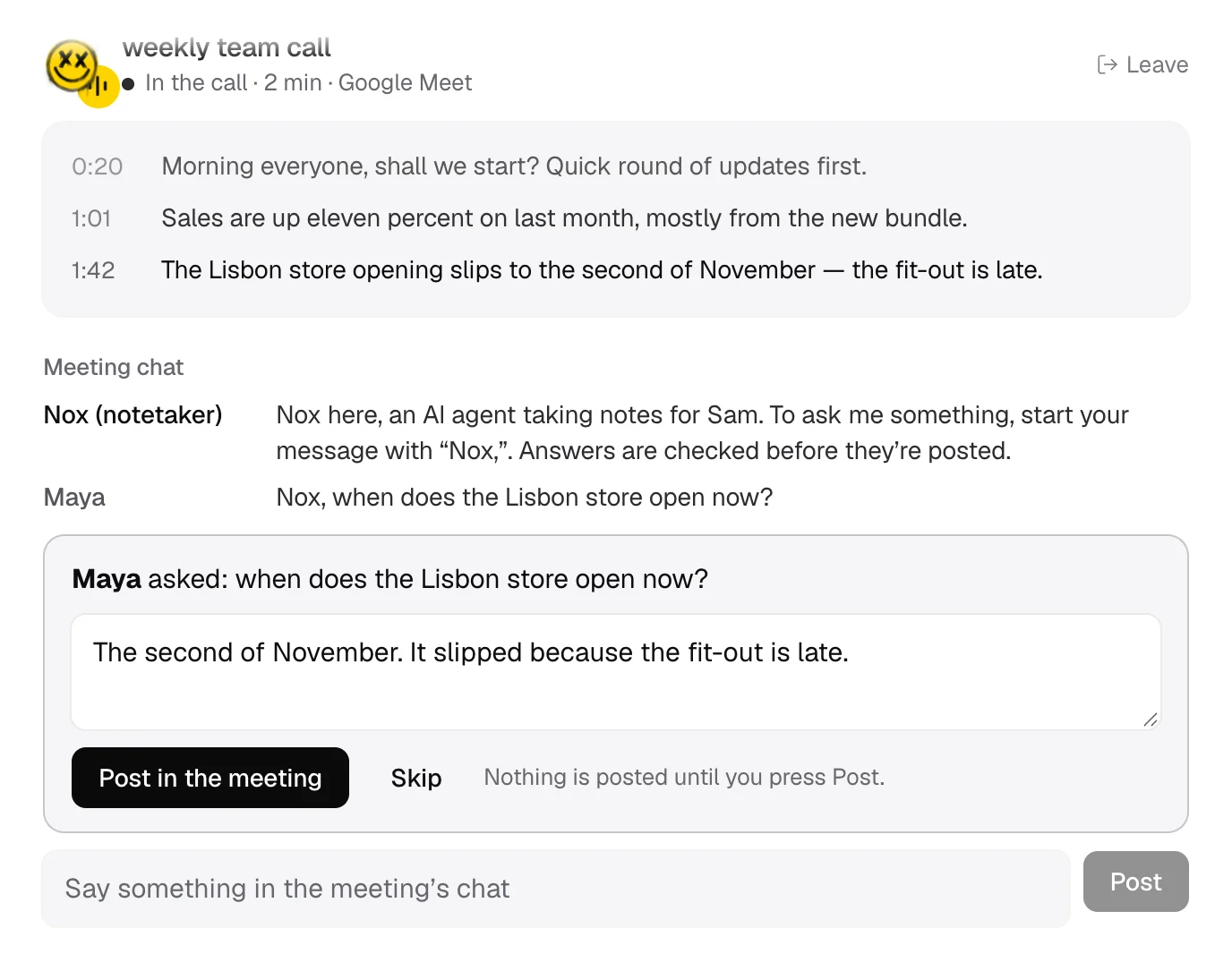
When the call ends, Nox saves the notes as a document, prepares a follow-up email for you to send to the people who were there, points out anything that shouldn't go outside, and offers to take on your own action items.
The meeting chat is new. We've tried it against pages built like each service's chat, and we'll keep checking it in real calls on every service.
What's new in the marketplace?
Four ready-made agents, each written for jobs people kept asking for:
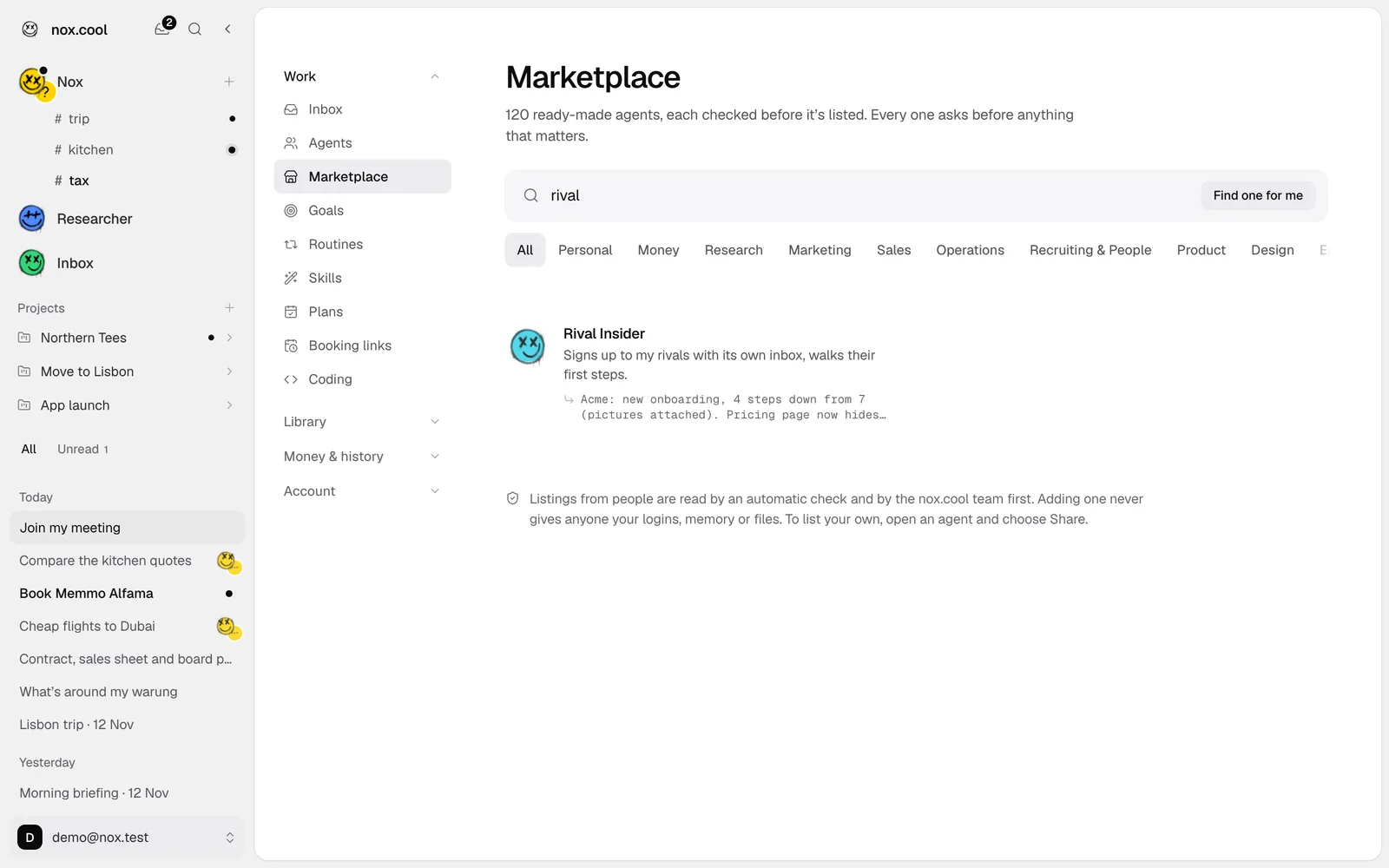
- Rival Insider signs up to your competitors' newsletters and free trials with its own inbox, walks their first steps, and tells you each week what changed.
- Field News Desk sends one short morning brief on your field, and speaks up at midday only when a company you watch does something big.
- Daily Product Walk uses your product every weekday from a test account and reports what's new, gone or broken.
- Event Page Maker builds an event page with a sign-up form, a limit and a waiting list, and keeps the guest list tidy.
Read the story behind the faces in Why should an AI agent's face show what it's doing?, or ask for early access.
Questions and answers
How do I change my AI agent's colour on nox.cool?
Open the agent's window (New agent, or the agent's own settings) and stay on the Face tab. Under the eight faces there's a row of eight colours. Pick one and the preview changes at once. Nox, the main agent, is yellow unless you change it.
What does the small picture next to my agent's face mean?
It shows what the agent is doing at that moment: a magnifier while it searches, lines filling in while it reads, a pencil while it writes, a pointer while it clicks, a paper plane while it sends, a shield around money, a question mark when it needs you, and Zs while it waits its turn.
Can Nox answer questions in a Google Meet or Zoom chat?
Yes, with your OK. When Nox sits in a meeting as your note-taker, a chat message that starts with its name comes to you as a card with a suggested answer taken only from what was said in that meeting. You can change it, post it or skip it. You can also write into the meeting's chat yourself from the meeting card in nox.cool.
Why doesn't Nox answer people in the meeting straight away?
In a meeting's chat anyone can type any name, so Nox can't tell whether a message really comes from you. Holding every answer for your OK means nobody in the call can get your agent to share something you didn't mean to share.
What happens after the meeting ends?
Nox writes the notes (summary, decisions, action items, open questions), saves them as a document, prepares a follow-up email to the people who were there for you to read and send, flags anything sensitive before it goes out, and offers to do or remind you of your own action items.
Where can I try this?
It's part of nox.cool's early access, which is by invite for now.
Try it with Nox
Anyone can sign up: on the web, or with Nox for Mac.
Keep reading

Why should an AI agent's face show what it's doing?
An AI agent works out of sight. How nox.cool gave each agent a colour you can spot and a moving picture of its job, and took it into the meeting's chat.

An AI agent that joins your meetings and takes the notes
Nox, nox.cool's AI agent, joins Google Meet, Zoom and Teams calls as a named guest, listens, and turns the call into notes and next steps. Here's how.

How should an AI agent show you it's working?
An AI agent can't know how far along a task is. Here's how nox.cool shows which agent is at work, whether it's moving, and when it needs you, honestly.