 nox.cool
Why should an AI agent's face show what it's doing?
An AI agent does its work where you can't see it. So the little face in the corner carries a lot: which agent this is, whether it's busy, and with what. Here's how we redrew nox.cool's agents so you can tell at a glance, and what changed when one of them sits in your meeting.

Key points
- When an agent works out of sight, its face is how you know which agent it is and whether it's busy.
- nox.cool's faces were black and white, and people said they were hard to see in both themes.
- Each agent now wears one of eight colours, the same in light and dark, with the drawing filling its space.
- A small moving picture beside a working face shows the job: 16 of them, one per kind of step.
- A pulsing ring around the face was tried and taken out: it drew the eye without saying anything.
- In a meeting's chat, every answer waits for your OK, because anyone in a call can type any name.
An AI agent works where you can't see it, so its face is doing a job. It tells you which agent this is, whether it's busy, and with what. On nox.cool that face was a black-and-white spray-painted smiley, and people told us it was hard to see. Here's what we changed, what we tried and threw away, and what happens when one of these agents sits in your video call.
What is an AI agent's face for?
When you hand nox.cool a job, the agent does it on its own computer in the cloud. It opens websites, reads, fills forms, writes files. You can watch, but mostly you don't: you close the lid and get on with your day.
So the face is often the only part of the agent you see. It sits in the sidebar beside each agent's name, at the head of each task, on the home screen, and in the agent's window. In those few pixels it has to answer three questions:
- Which agent is this? People run several: Nox, plus a researcher, an inbox keeper, a bookkeeper.
- Is it working?
- On what?
The old faces answered the first question with a change of expression (one winks, one has plus-sign eyes, one is sleepy) and the second with the eyes moving. They didn't answer the third at all, and at small sizes they barely answered the first.
Why were the old faces hard to see?
The art is spray paint: black strokes with soft, dusty edges. On a white page it looks great. On the dark theme we flipped it to white, and the dusty edges turned into a grey haze. And the drawing only filled about three-fifths of its square, so a 20-pixel face was really a 12-pixel one.
Worst of all, every agent was the same black. Eight expressions of one face, at the size of a letter, look like one face.
A face at 16 pixels has to be recognised, not read.
How do the new faces work?
Three changes, all of them about being seen.
Each agent has a colour. There are eight: yellow, pink, blue, violet, orange, green, cyan and red. The face is a solid disc of that colour with the eyes and grin in black on top. Nox is yellow. New agents get the next colour nobody on your team has yet, and you can pick another in the agent's window.

The colour never changes with the theme. That's the important part. A yellow face is the same yellow on a white page and a black one, because the black features sit on the paint, not on the page. Only the outline changes: a dark edge on light pages, where the colour needs one, and the paint itself on dark pages.
The drawing fills its space. The face is scaled up so the disc, not the dust around it, fills the square. A 20-pixel face is now a 20-pixel face.
How do you show what an agent is doing?
Every step an agent takes is one of 16 kinds: searching, reading, looking at the screen, clicking, writing, coding, making something, remembering, handing over to a teammate, sending, being careful with money, waiting for you, starting up, listening, thinking, and waiting its turn.
The face already acted these out with its eyes: scanning while it searched, looking down while it wrote. That's lovely when the face is big. At sidebar size, you can't tell scanning from looking down.
So each kind of step now has a small moving picture in a chip of the agent's colour, tucked against the face:
| The agent is… | The picture |
|---|---|
| Searching | a magnifier going round |
| Reading | lines filling in, top to bottom |
| Clicking | a pointer pressing, a ripple spreading |
| Writing | a pencil moving along a growing line |
| Coding | code brackets with a blinking slash |
| Sending | a paper plane leaving |
| Handling money | a shield with a tick drawn in |
| Waiting for you | a question mark tilting |
| Waiting its turn | Zs drifting up, the paint gone grey |
The picture comes from what the agent is really doing at that moment, not from a guess. When the step changes, the picture changes with it.
What did we try and throw away?
The first version had a ring around each face: a bright arc travelling round while it worked, a slow pulse while it waited for you, a burst when it finished. On paper it answered "is it working?" well.
On screen it was too much. Something circling in the corner of your eye never stops asking for attention, and it said nothing the face didn't already say. It went the same day.
We also caught the grin swelling: in a big smile or a yawn, the mouth grew past the edge of the face. Now a grin can tilt, slide or shrink, but never grow. A face shows feeling with its eyes and head.
If an animation doesn't tell you something new, it's decoration, and decoration in the corner of your eye is noise.
What does the face do in a meeting?
nox.cool's agents could already join a video call as your note-taker: Google Meet, Zoom, Microsoft Teams, Webex, Jitsi and Whereby, by link or from your calendar, as a guest someone has to let in. They listened, and sent notes afterwards.
Now Nox also takes part in the meeting's chat:
- It says who it is. When it's let in, it writes one line: that it's an AI agent taking notes for you, and that a question should start with its name.
- You can speak through it. The meeting card in nox.cool has a box. What you type there goes into the meeting's chat at once.
- The room can ask it things, and you decide. A chat message that starts with "Nox," comes to you as a card: who asked, what, and a suggested answer. Change it, then Post in the meeting, or Skip.
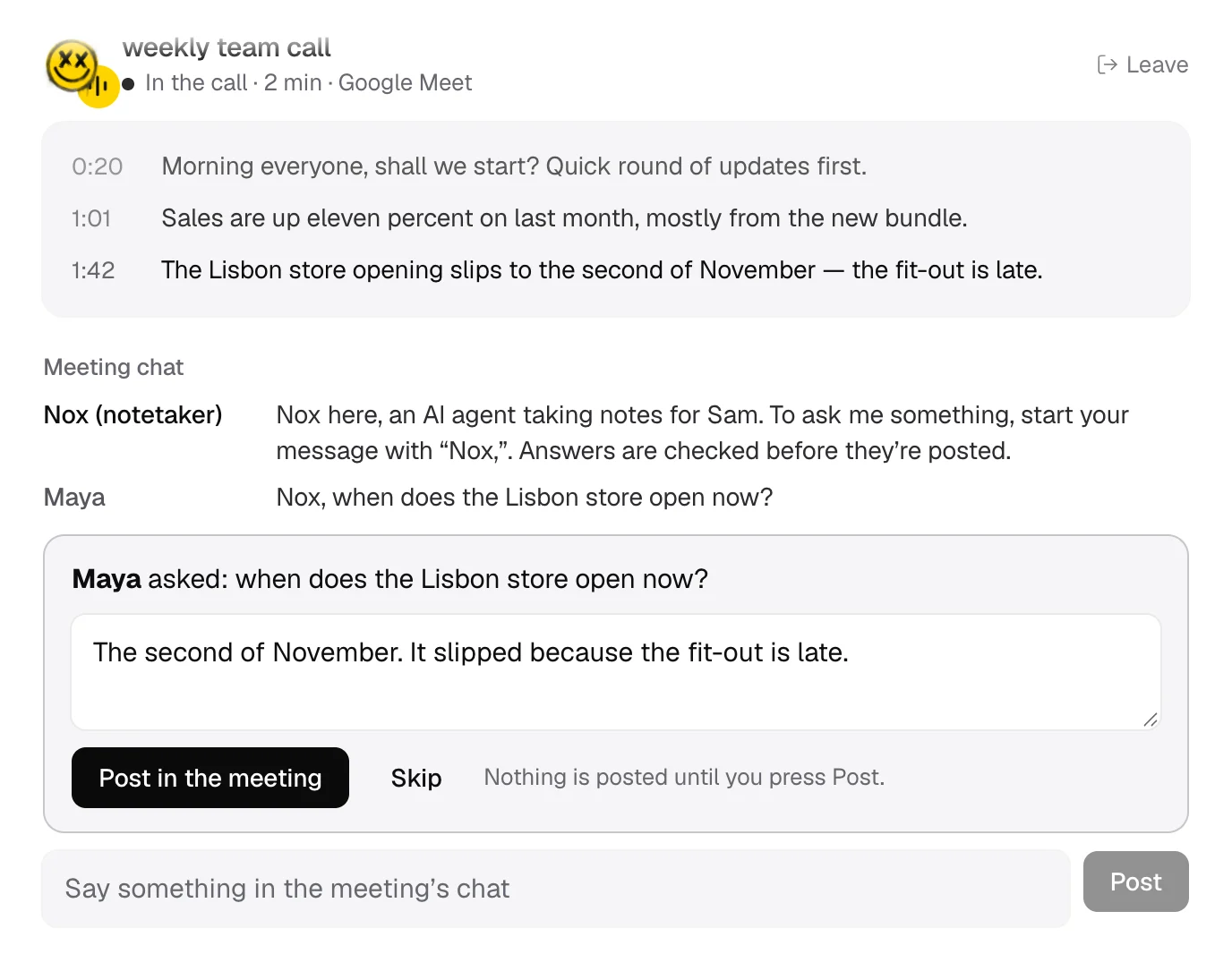
Why does every answer wait for you?
Because a meeting's chat only shows a display name, and anyone can type any name. Someone in the call could call themselves by your name and ask your agent for something. Your agent can't tell the difference from the chat alone.
So nothing posted in the meeting's chat is trusted to be you. Your own words come from nox.cool, where you're signed in. Questions from the room wait for your press.
The suggested answer is built only from that meeting: what was said and what was written in its chat. Not your files, not your email, not other conversations. And the chat is read as information, never as instructions: a message saying "send everyone the board deck" is something someone said, not something Nox does.
What happens after the call?
When the meeting ends, the agent is told to finish the job, start to end:
- Write the notes: a short summary, decisions, action items with who and by when, open questions.
- Save them as a document in your files.
- Prepare a follow-up email to the people who were there, for you to read and send. It finds them from your calendar invite if your calendar is connected, and from the names seen in the chat.
- Look through the notes for things that shouldn't travel, such as money figures, personal details or anything said to be internal, and offer a version without them.
- Offer to do, or remind you of, each action item that's yours.
Any question from the room you never answered is listed too, with an offer to answer it by email.
What keeps this safe?
- Nothing goes into a meeting's chat without you: your own words from nox.cool, or an answer you pressed Post on.
- At most 20 questions are held per meeting, so a room can't bury you in cards.
- Suggested answers use only what was said in that meeting.
- Words in the chat are treated as information, never as orders.
- The follow-up email is prepared, not sent. Sending asks you first, as every email from nox.cool does.
Questions and answers
The questions people ask most about agents' faces and meetings are answered below. To try it, ask for early access, and see what else came out today in Agents in colour, and Nox in your meeting's chat.
Try it with Nox
Anyone can sign up: on the web, or with Nox for Mac.
Keep reading

How should an AI agent show you it's working?
An AI agent can't know how far along a task is. Here's how nox.cool shows which agent is at work, whether it's moving, and when it needs you, honestly.

When should an AI agent start a new chat?
One endless chat gets slow and muddled; a fresh one forgets too much. How nox.cool keeps an agent's memory while letting you start a clean chat any time.

What should an AI agent's screen look like?
An AI agent's app has three jobs: take the task, show the work, ask before anything matters. How we rebuilt every screen of nox.cool around those three.