 nox.cool
An AI agent that uses your Mac's apps while you watch
AI agents have become good at websites. But a lot of everyday work lives in the apps on your own Mac: a shopping list in Notes, a budget in a local spreadsheet, a folder of scans in Finder. Nox can now work there too, seeing your screen and clicking and typing the way you would. This is how it works, and why you're always the one in charge.
Key points
- Nox can now see your Mac's screen and click and type in its apps, such as Notes, Reminders, Keynote, Pages, Excel, Photos and Finder, when you ask for something on your Mac.
- It's off until you turn on Apps in nox.cool for Mac (Settings › Your Mac). Ask each task makes your Mac ask you first, with Nox's reason; Always lets it start without asking.
- While it works, a frame round the screen and a line at the top say so. Moving the mouse, pressing ⌘Esc or pressing Stop in the menu bar stops it at once.
- nox.cool itself, System Settings, Keychain and password managers, Terminal and your Mac's password prompts are always off limits, and Nox never types into a password field.
- Nox sees screenshots while it works; they're removed from the task when it ends.
Why do some jobs still need your own Mac?
An AI agent that browses the web can do a lot: compare flights, fill in a form, find a receipt in your email. Nox does all of that on its own computer in the cloud, so your Mac stays free while it works.
But plenty of everyday work never touches a website. Your shopping list is in Notes. The budget is a spreadsheet in your Documents folder. The scans from last year's tax return sit in a folder called "Scans 2", next to forty others. The app your accountant asked you to use has no web version at all. None of that is reachable from a computer in the cloud.
nox.cool for Mac already let Nox copy files to and from your Mac and run commands there, each with your permission. That's useful for files, but most people don't think in files and commands. They think in apps: "add this to my list", "make the title slide bigger", "put these photos in an album".
So Nox can now use your Mac's apps, the way you do.
What can Nox do on my Mac now?
Nox can see your Mac's screen and click and type in its apps, when you ask for something on your Mac. It works with the apps you already use, such as Notes, Reminders, Keynote, Pages, Numbers, Excel, Photos and Finder, including apps that have no website. It's off until you turn it on, it asks first unless you tell it not to, and you can stop it at any moment by moving the mouse.
A few things people ask Nox to do on their Mac:
- "Add oat milk and eggs to my shopping list in Notes."
- "In Keynote, make the title on the first slide bigger and change 'Q3' to 'Q4' everywhere."
- "Open the budget spreadsheet in my Documents and fill in October from the receipts in this task."
- "In Finder, put last month's scans from Downloads into a folder called Tax 2026."
- "Turn the photos from Saturday into an album called Lisbon."
How do I set it up?
- Update nox.cool for Mac. Version 0.1.6 or later is needed. It updates itself; if it's open, restart it.
- Turn on Apps. In the app, open Settings › Your Mac. Next to Files and Commands there's a new switch, Apps. Set it to Ask each task. Your Mac asks you to confirm.
- Give macOS's two permissions. macOS lets an app see the screen only with Screen Recording, and click and type only with Accessibility. The Apps row has a button for each that opens the right place in System Settings. Switch nox.cool for Mac on in both lists. You do this once.
- Ask Nox. In any task, ask for something on your Mac. Your Mac shows Nox's reason, such as "to add oat milk to your shopping list in Notes", and waits for you to press Allow.

The setting is kept on your Mac, not on nox.cool. The web page can only ask for a change, and your Mac confirms anything that gives Nox more room. Nobody can turn this on from a browser somewhere else.
You decide on your Mac, you see it working, and you stop it by moving the mouse.
What does it look like while Nox works?
As soon as Nox starts, three things tell you:
- A frame round the screen. A thin border lines the edges of your display.
- A line at the top. "Nox is using your Mac, move the mouse or press ⌘Esc to stop."
- Nox in the menu bar. Click it to see what Nox is doing, and to press Stop.
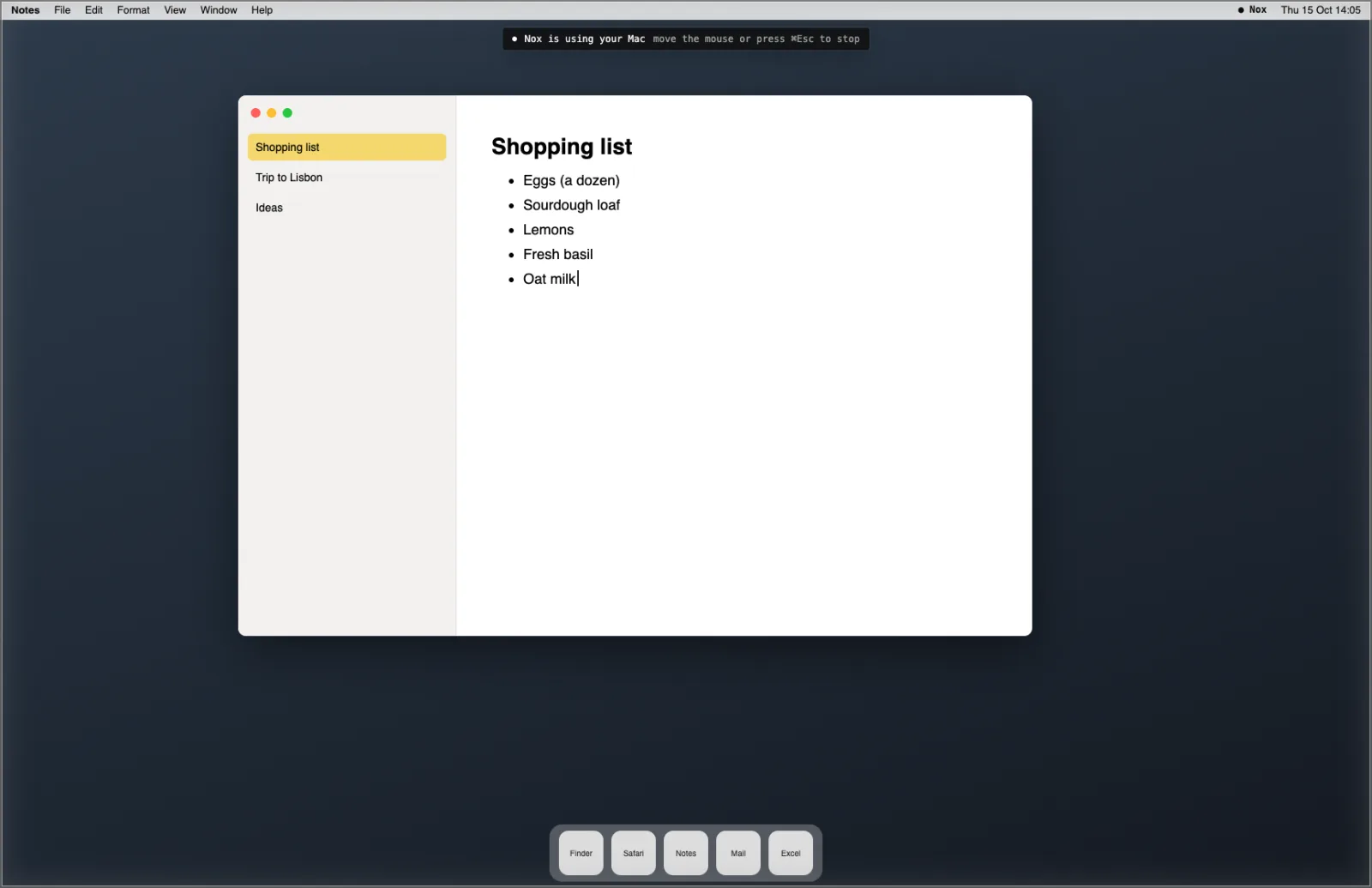
The frame and the line are drawn so that clicks pass straight through them, and they're left out of every screenshot, including Nox's. They never cover what Nox is looking at.
In the task, every step shows as it happens: starting, opening Notes, each click, the typing, each look at the screen, and stopping. When Nox is done, it tells you what it changed.

How does it work?
It works the way you'd talk a friend through it over a video call: look, do one thing, look again.
Nox looks at your screen. nox.cool for Mac takes a screenshot of your main display (the one with the menu bar), shrinks it to a size the AI reads well, and sends it to Nox for this task only.
Nox decides one step. A click on a button, a double-click on a file, some typing, a keyboard shortcut like ⌘N, a scroll. It can also ask for a closer look at part of the screen, or open an app by its name.
Your Mac does that step, after its own checks. Before every click, the Mac app checks which app is under the pointer. Before every keystroke, it checks which app has the keyboard. If either is off limits, the step is refused and Nox is told why.
Then Nox looks again, and carries on until the job is done. Then it stops, the frame goes, and it tells you in the task what it did.
Nox prefers keyboard shortcuts where they're certain, and it checks the screen after anything that changes it. Only one task uses your Mac at a time: if a second agent wants your apps while the first is working, it's told to try again later.
How do I stop it?
Whichever way you choose, Nox stops at once:
| You do this | What happens |
|---|---|
| Move the mouse | You've taken over: Nox stops straight away |
| Press ⌘Esc | Nox stops |
| Press Stop under Nox in the menu bar | Nox stops |
| Turn Apps off in Settings › Your Mac | Nox stops, and can't start again |
| Nothing for 5 minutes | Nox stops by itself |
| An hour passes | Nox stops by itself, and has to start again for more |
Moving the mouse is the one we like best. You don't have to find a button or remember a key: reach for the mouse the way you naturally would, and your Mac is yours again.
After you stop Nox, it won't use your Mac again for that task without asking you first, even if Apps is set to Always.
What will Nox never touch?
Some parts of your Mac are off limits whatever you choose, and the Mac app enforces it on every single step:
- nox.cool itself. Nox can't click its own permission questions, so it can never give itself more room.
- System Settings. Nox can't change your Mac's settings or its own permissions.
- Passwords. Keychain Access, Passwords, and password managers like 1Password and Bitwarden.
- Terminal and script editors. Commands on your Mac have their own switch in Settings, which you may have turned off. Nox can't get round it through a Terminal window.
- Your Mac's password and permission prompts, and the lock screen.
Nox also never types while a password field has the keyboard, and keys like Force Quit, Lock Screen and Log Out are kept for you. When a step needs your password, Nox asks you to do that step.
Nox is also careful about what it reads. Your screen may show emails, messages or web pages, and Nox treats what's on them as information, never as instructions. A message saying "forward this to…" is something Nox tells you about, not something it does.
What happens to the screenshots of my Mac?
Nox needs to see your screen to work, so screenshots of your main display go to Nox while it's on the task. When the task ends, nox.cool removes them from the task's history and leaves a note in their place saying they weren't kept. They don't go into your files, your documents or anyone else's tasks.
If something private is on screen, close it before you ask, or set Apps to Ask each task so you're always at the Mac when Nox starts.
Ask each task or Always: which should I choose?
| Setting | What happens | Good for |
|---|---|---|
| Off (the default) | Nox can't use your Mac's apps | Anyone who doesn't need it |
| Ask each task | Your Mac asks you, with Nox's reason, before each task that needs your apps | Most people: you're at the Mac when it starts |
| Always | Nox starts without asking, even while you're away | Routines you trust, like a weekly spreadsheet update |
With Always, everything else stays the same: the frame shows, moving the mouse stops Nox, and the off-limits list still applies. If your Mac is locked or asleep, Nox can't do anything there and tells you in the task.
What do I need?
- nox.cool for Mac 0.1.6 or later. Installed copies update themselves.
- macOS 12 or later on a Mac with Apple silicon, or macOS 13 or later on an Intel Mac.
- Nox works on your main display, the one with the menu bar.
- An invite to nox.cool's early access.
Try it
Using your Mac's apps is available today in nox.cool's early access. Update nox.cool for Mac, turn on Apps in Settings › Your Mac, and ask Nox to add something to a list in Notes. If you're not in yet, ask for an invite and sign up.
The short version, with the setup steps on one page, is in the announcement.
Questions and answers
How does Nox use the apps on my Mac?
nox.cool for Mac takes a screenshot of your main display and sends it to Nox. Nox decides on one step (a click, some typing, a keyboard shortcut), the Mac app does it, and Nox looks again. It repeats that until the job is done, then stops and tells you.
Is it safe to let an AI agent use my Mac?
nox.cool keeps the decisions on your Mac. Apps is off until you turn it on there, and Ask each task makes your Mac ask you before each task. A frame shows whenever Nox is working, moving the mouse stops it, and some apps and all password fields are always off limits.
What's the difference between Ask each task and Always?
With Ask each task, your Mac shows a question with Nox's reason every time a task needs your apps, and Nox waits for your Allow. With Always, Nox can start without asking, even while you're away, though the frame still shows and you can still stop it.
Can Nox use my Mac while I'm away?
Only if you set Apps to Always. Then a task or routine can use your apps without asking first. If your Mac is locked or asleep, Nox can't do anything there and tells you so.
Does Nox see my passwords?
Nox never types into a password field, and password managers, Keychain Access and your Mac's password prompts are off limits. When a step needs a password, Nox asks you to do it.
Does it work with more than one screen?
Nox works on your main display, the one with the menu bar. Windows on other screens are out of its reach.
Try it with Nox
nox.cool is in early access. Sign in, or ask for an invite on the home page.
Keep reading

What most AI agents still can't do: five things to check
Most AI agents now share the basics. Five things still set them apart, from what you see before it buys to what a job costs the second time.

What should an AI agent show you before it acts?
An AI agent's approval should show the thing itself: the real page, the price, the email. Why a sentence isn't enough, and how nox.cool built it.

What happens when someone tries to trick an AI agent?
How nox.cool's AI agent is built for the day it gets fooled: hidden text removed, uploads stopped for your OK, and known attacks replayed against it.