 nox.cool
Nox can now use the apps on your Mac
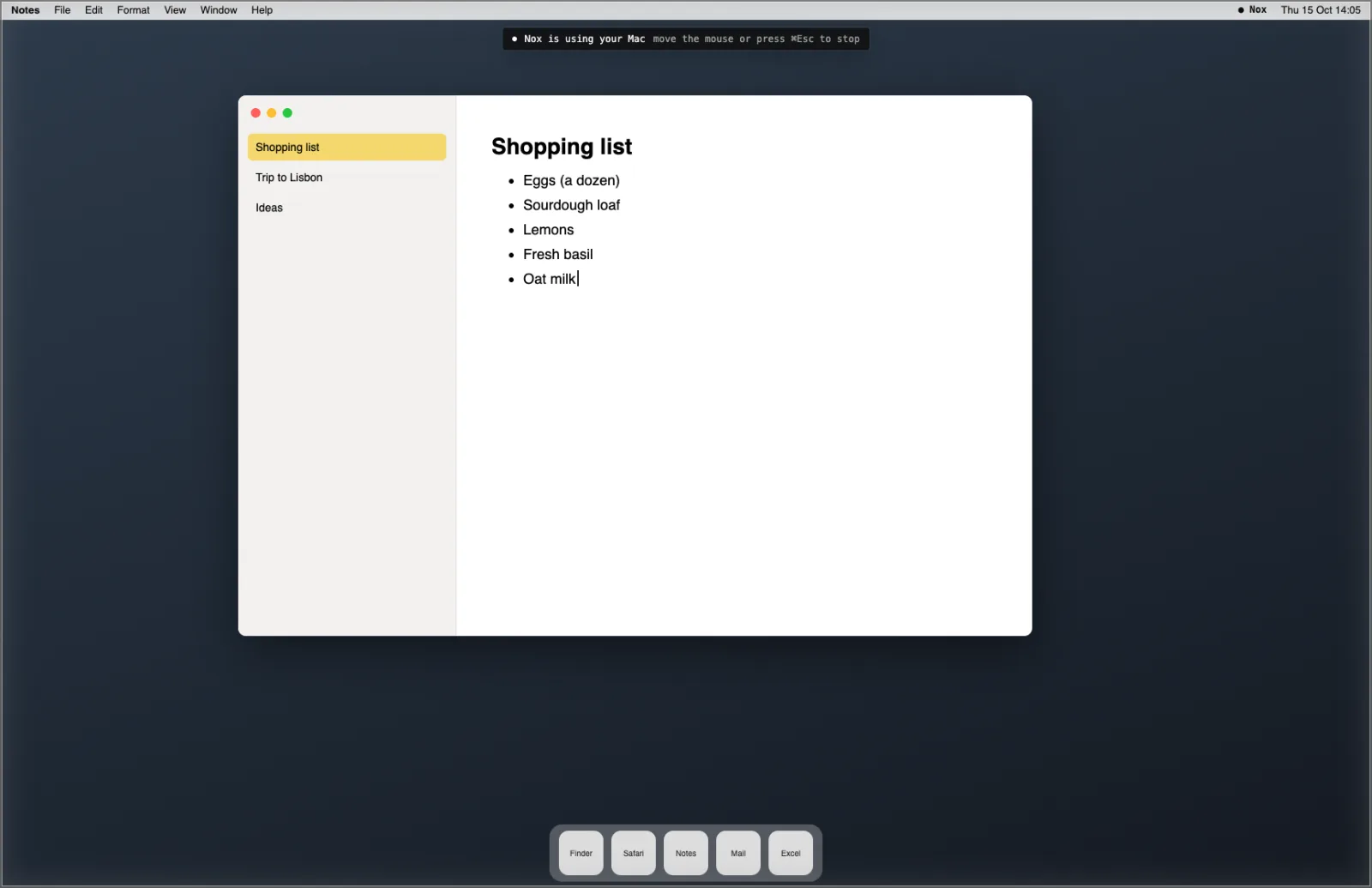
nox.cool's AI agent can now work in the apps on your own Mac. Ask Nox to add something to a list in Notes, tidy a folder in Finder or fill in a spreadsheet, and it sees your screen, clicks and types the way you would. A frame round the screen shows while it works, and moving the mouse stops it at once.
Key points
- Your Mac's apps: Nox can see your screen and click and type in apps like Notes, Reminders, Keynote, Excel, Photos and Finder, including apps that have no website.
- Your call, on the Mac: a new Apps switch in Settings › Your Mac, set to Off until you change it. Choose Ask each task (your Mac asks you first, with Nox's reason) or Always.
- Always visible, always stoppable: a frame round the screen and a line at the top while Nox works. Move the mouse, press ⌘Esc or press Stop in the menu bar, and it stops.
- Never, whatever the setting: nox.cool itself, System Settings, Keychain and password managers, Terminal, and your Mac's password prompts. Nox never types into a password field.
- Screenshots aren't kept: Nox sees your screen while it works, and when the task ends the pictures are removed from the task.
nox.cool's AI agent can now work in the apps on your own Mac. Ask Nox for something in Notes, Keynote, Excel, Photos or Finder, and it sees your screen and clicks and types there, the way you would. It's available today in nox.cool's early access, with nox.cool for Mac 0.1.6.
What can Nox do on my Mac now?
Until now, Nox did its work on its own computer in the cloud, and on your Mac it could copy files and run commands. Now it can also use your Mac's apps. That covers the things that only live on your Mac: your notes, a spreadsheet you keep locally, your photo library, a folder that needs tidying, or an app that has no website at all.
You ask in plain words, for example "add oat milk to my shopping list in Notes on my Mac". Nox says what it's about to do, opens the app, looks at the screen after each step, and tells you when it's done.

How do I turn it on?
- Make sure nox.cool for Mac is up to date. It updates itself; if it's open, restart it to get version 0.1.6.
- In the app, open Settings › Your Mac, and set Apps to Ask each task (or Always). Your Mac asks you to confirm.
- Press Allow Accessibility and Allow Screen Recording, and switch nox.cool for Mac on in each list. macOS asks for these once.
- Ask Nox for something on your Mac. With Ask each task, your Mac shows Nox's reason and waits for your Allow.

How do I know when Nox is using my Mac, and how do I stop it?
While Nox works, a thin frame goes round your screen with a line at the top: "Nox is using your Mac". Nox's name appears in the menu bar too, with a Stop button. To stop it, do any of these:
- Move the mouse. You've taken over, and Nox stops straight away.
- Press ⌘Esc.
- Press Stop under Nox in the menu bar.
After you stop it, Nox won't use your Mac again for that task without asking you. It also stops by itself after 5 minutes without a step, and after an hour at most. The frame never appears in Nox's own screenshots, so it can't get in the way of what Nox sees.
What keeps my Mac safe?
Some things are off limits whatever you choose: nox.cool itself (so Nox can't answer its own permission questions), System Settings, Keychain Access and password managers, Terminal and script editors, your Mac's password and permission prompts, and the lock screen. Nox never types into a password field; signing in stays with you. Keys like Force Quit and Log Out are kept for you too.
Screenshots of your Mac are seen by Nox while it works and are removed from the task when it ends. Only one agent can use your Mac at a time.
The full story of how it works, and how to choose between Ask each task and Always, is on the blog. If you're not in yet, ask for an invite and sign up.
Questions and answers
Can an AI agent use the apps on my Mac?
Yes. With nox.cool for Mac 0.1.6 or later and the Apps switch turned on, Nox can see your Mac's screen and click and type in its apps, such as Notes, Keynote, Excel, Photos and Finder. It does this only when you ask for something on your Mac.
How do I stop Nox using my Mac?
Move the mouse, press ⌘Esc, or press Stop under Nox in the menu bar. Nox stops at once, and it asks you before using your Mac again for that task. It also stops by itself after 5 minutes without a step.
Which apps can't Nox use on my Mac?
Nox never uses nox.cool itself, System Settings, Keychain Access, Passwords or other password managers, Terminal or script editors, your Mac's password and permission prompts, or the lock screen. It never types into a password field.
Does nox.cool keep screenshots of my Mac?
No. Nox looks at your screen while it works on the task. When the task ends, the screenshots are removed from the task's history, and only a note that they weren't kept remains.
What do I need to use it?
nox.cool for Mac 0.1.6 or later, which updates itself, on macOS 12 or later (macOS 13 or later on Intel Macs). The first time, macOS asks you to allow the app under Accessibility and Screen Recording.
Try it with Nox
nox.cool is in early access. Sign in, or ask for an invite on the home page.
Keep reading

An AI agent that uses your Mac's apps while you watch
Nox, nox.cool's AI agent, can now see your Mac's screen and click and type in apps like Notes, Excel and Finder. How it works, and how you stay in charge.

What most AI agents still can't do: five things to check
Most AI agents now share the basics. Five things still set them apart, from what you see before it buys to what a job costs the second time.

What should an AI agent show you before it acts?
An AI agent's approval should show the thing itself: the real page, the price, the email. Why a sentence isn't enough, and how nox.cool built it.