 nox.cool
An AI that edits your Word file with tracked changes
Most AI tools rewrite your document and hand you new text, so you're left comparing two versions by eye. Nox hands back your own Word file with every change marked as a tracked change, and the rest of it exactly as you sent it.

Key points
- Ask Nox to change a Word file and you get your own file back with tracked changes: deletions struck through, insertions underlined, each by Nox.
- Only the words that change are marked. Headers, styles, numbering, pictures and comments stay exactly as they were in your file.
- You decide each change. Accept or reject them one by one in Word, or in any editor that reads Word's tracked changes.
- For exact edits, give Nox the words to find and what to put instead; it refuses a find that matches more than one place.
- Your original stays as you sent it, in your Documents, next to the marked-up copy.
nox.cool's AI agent, Nox, now edits your Word documents the way a careful colleague would: it hands back your own file with every change marked as a tracked change. Deletions are struck through, insertions are underlined, and everything it didn't change stays exactly as you sent it. You accept or reject each change in Word. It's available today in nox.cool's early access.
Why is editing a Word file with AI so awkward?
Ask most AI assistants to tighten a contract and you get the whole thing back as new text. That leaves you with three jobs the AI should have done for you.
- Finding what changed. You compare two versions line by line, or paste both into a comparison tool and hope it lines them up.
- Putting the formatting back. Text pasted out of a chat loses your styles, numbering, headers and the house font.
- Showing others what changed. Lawyers, HR and anyone sending a contract back expects redlines, not a clean copy. A clean copy invites "what did you change?".
Tracked changes solve all three, and they're how people already work together on documents. So that's what Nox now gives you.
What does Nox hand back?
Your own file. Not a copy rebuilt from text, and not a new document in the same words: the file you sent, with the changes written into it as Word's own tracked changes, made by "Nox".
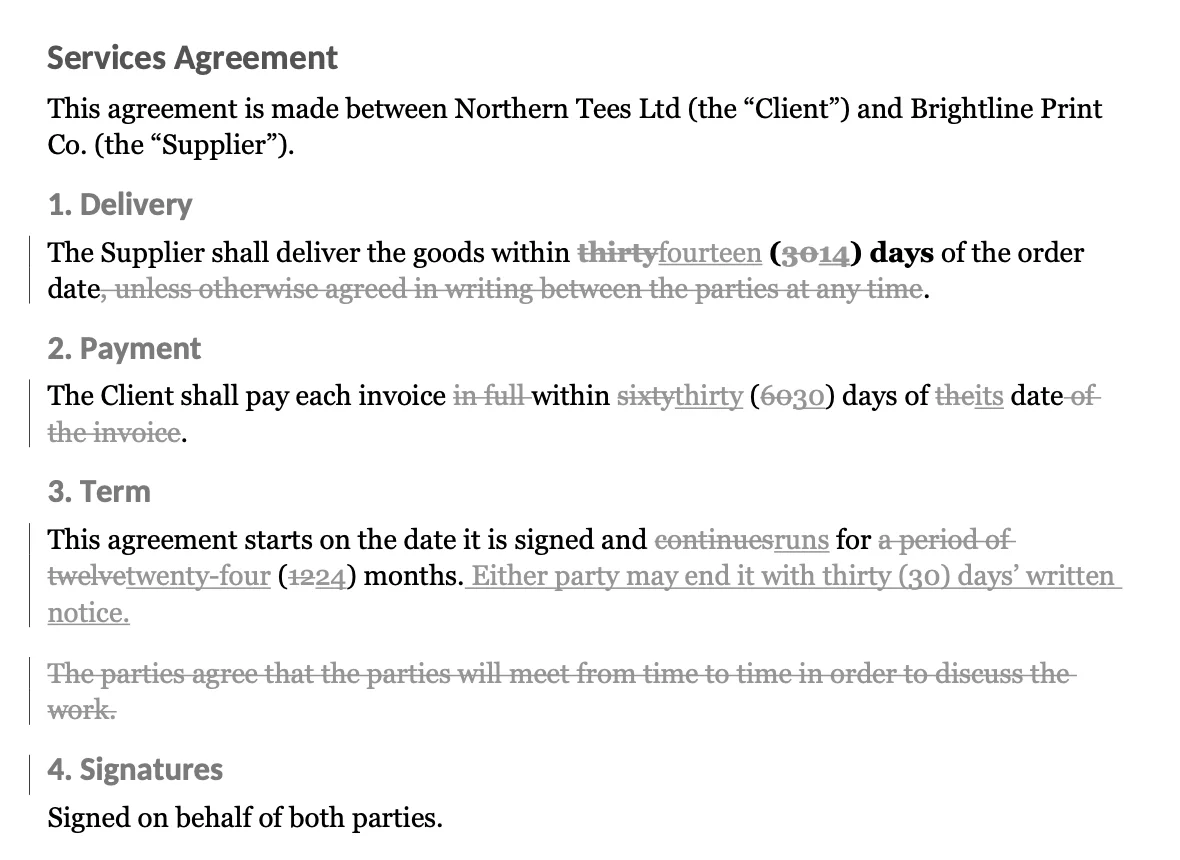
Inside a changed paragraph, only the words that differ are marked. If "thirty (30) days" becomes "fourteen (14) days", you see "thirty" and "30" struck through with "fourteen" and "14" beside them. The words around them, "days of the order date", aren't touched. Bold stays bold, and inserted words take the formatting of the words they sit in.
Paragraphs Nox adds come in as inserted paragraphs. Paragraphs it removes are marked deleted, with their paragraph mark, so accepting the deletion joins the text up as Word would.
How do I ask Nox to edit my Word document?
- Give Nox the file. Attach the .docx to your message with the paperclip, or point at one already in your Documents.
- Say what you want, and ask for tracked changes. For example: "Check my contract, tighten the wording and give it back with tracked changes."
- Read Nox's summary. It replies with the marked-up file and a short list of what it changed and why.
- Open the file and decide. In Word, the Review tab steps through each change, with Accept and Reject for each one or for all of them.

Your original stays in your Documents as you sent it, next to the marked-up copy, so there's always a clean starting point.
A worked example: a supplier agreement
The agreement in the picture above is a short one: who it's between, then delivery, payment, term and signatures. The ask was "tighten the wording and give it back with tracked changes". Here is what came back.
- Delivery: "thirty (30) days" became "fourteen (14) days", and the escape hatch "unless otherwise agreed in writing between the parties at any time" was deleted.
- Payment: "in full within sixty (60) days of the date of the invoice" became "within thirty (30) days of its date".
- Term: "continues for a period of twelve (12) months" became "runs for twenty-four (24) months", with a new sentence after it: either party may end it with thirty days' written notice.
- A paragraph cut: "The parties agree that the parties will meet from time to time in order to discuss the work" said nothing the rest didn't, so it was marked deleted as a whole.
- Untouched: the title, the parties, every heading and the signatures.
That's 22 tracked changes, because a replaced word is two of them: "thirty (30)" to "fourteen (14)" alone is four, two words out and two words in. Each one can be accepted or rejected on its own. If you like the new delivery and payment terms but not the notice period, accept the first two, reject the new sentence, and the file says exactly what you agreed to.
How do I get good redlines?
The same things that help a colleague help Nox.
- Say what must not change. "Don't touch the definitions or the signature block" keeps those paragraphs out of it entirely.
- Say the tone. "Plain English, no legal jargon", or "keep it formal, it's going to their lawyers".
- Say what it's for. "We're the client, make it fairer to us" produces very different edits from "tidy the grammar".
- Ask for reasons. "Tell me why for each change" gets you a short note per change in the reply, beside the file.
- Go round again. "Undo the change to the term, and make the notice period sixty days" gives you a new marked-up file, again from your original, so the marks always compare against what you first sent.
What kinds of edits work well?
Anything where you'd want to see each change before it goes in:
- Contracts and agreements: shorten delivery times, change payment terms, cut a clause that repeats another, add a notice period.
- Proposals and quotes: update prices, dates and names across the document without retyping it.
- CVs and cover letters: fix grammar, tighten bullet points, swap in the right company name.
- Policies and handbooks: turn long sentences into plain English, paragraph by paragraph.
- Your own drafts: "make this half as long" is much easier to judge as redlines.
Can I give it exact words to change?
Yes. When you know exactly what should change, say so: "change 'sixty (60) days' to 'thirty (30) days' and 'Supplier' to 'Vendor' in clause 3". Nox makes exactly those edits and marks them.
Each phrase you name must appear once in the document. If "the Supplier" appears in eleven places and you meant one, Nox asks for a few words around it instead of guessing.
How does it work?
Nox works on its own computer in the cloud, with the tools a careful person would use.
- It keeps your original as it came, and makes the edits on a copy.
- It lines the two up paragraph by paragraph. Paragraphs that are the same are left alone. Paragraphs that changed are paired with their new versions; where a paragraph was rewritten so completely that it shares little with the old one, the old paragraph is marked deleted and the new one inserted, which reads far better than a word salad of tiny changes.
- Inside each changed paragraph, it compares word by word and marks only the words that differ, keeping each word's own formatting.
- It writes those marks into your file and nothing else. Every other part of the file is copied across untouched: styles, headers and footers, numbering, pictures, comments and settings.
What isn't tracked?
Being clear about this matters, because a redline that silently misses a change is worse than none.
| Change | How it shows |
|---|---|
| Words added, removed or replaced in a paragraph | Tracked, word by word |
| A paragraph added or removed | Tracked, as a whole paragraph |
| A paragraph rewritten from scratch | Old one tracked as deleted, new one as inserted |
| A paragraph with links, fields or earlier tracked changes | Replaced as a whole, tracked |
| Formatting alone (bold, sizes, styles) | Not tracked |
| New tables or pictures | Not tracked |
For formatting changes or new tables, make those yourself, or ask Nox for a clean copy as well.
How is this different from pasting a document into a chat?
| Pasting into an AI chat | Nox, with tracked changes | |
|---|---|---|
| You get back | New text | Your own file |
| Formatting, styles, numbering | Lost or rebuilt | Kept as they were |
| What changed | You find it | Marked, change by change |
| Accept or reject each change | Not possible | In Word's Review tab |
| Your original | Wherever you left it | Kept in your Documents |
What keeps my document safe?
- Nothing is accepted for you. Nox only marks changes. Every decision is yours, in your editor.
- Your original is never overwritten. The marked-up file is a new file beside it.
- Your document stays with you. It lives in your Documents and on your agent's own computer, which only you and your agents use. Sending it to anyone, by email or anywhere else, asks you first on its own card, like everything important Nox does.
- Nothing hidden. Every change carries Nox's name as its author and the time it was made, so anyone you send it to can see who suggested what.
Questions and answers
Can AI edit a Word document with tracked changes?
Yes. nox.cool's AI agent, Nox, reads your .docx, edits a copy, and writes the differences back into your own file as Word tracked changes. You open it in Word and accept or reject each change, the same way you would with a colleague's edits.
Will the rest of my document change?
No. Only the paragraphs whose words change are touched, and only the changed words inside them are marked. Every other part of the file, from styles and headers to numbering, pictures and comments, stays exactly as it was.
What isn't tracked?
Changes to formatting alone, new tables and new pictures aren't marked. A paragraph with links, fields or changes already tracked in it is replaced as a whole: the old one marked deleted and the new one inserted.
Can I give Nox exact words to change?
Yes. Say, for example, "change 'sixty days' to 'thirty days' in the payment clause". Each phrase you name must appear once; if it appears more than once, Nox asks for a few words around it so it changes the right one.
Does Nox accept the changes for me?
No. It only marks them. Accepting or rejecting each change is yours, in your editor.
Where can I try it?
It's available today in nox.cool's early access, which is by invite for now.
Try it with Nox
nox.cool is in early access. Sign in, or ask for an invite on the home page.
Keep reading

What most AI agents still can't do: five things to check
Most AI agents now share the basics. Five things still set them apart, from what you see before it buys to what a job costs the second time.

What should an AI agent show you before it acts?
An AI agent's approval should show the thing itself: the real page, the price, the email. Why a sentence isn't enough, and how nox.cool built it.

What should an AI agent's screen look like?
An AI agent's app has three jobs: take the task, show the work, ask before anything matters. How we rebuilt every screen of nox.cool around those three.